MORE VERSIONS AVAILABLE
John Deere
Paul Johnson on April 16th
Introduction
The use of digital diagnostic tools on agricultural and construction machinery is essential to ensure efficient maintenance and rapid fault detection. The software allows technicians to access real-time data, make parameter adjustments and obtain detailed technical information for repair and optimization of equipment performance. Implementation can be affected by various technical errors, the most common problem affecting performance is runtime, which prevents the software from loading certain essential modules correctly.
Detailed descriptions of common errors
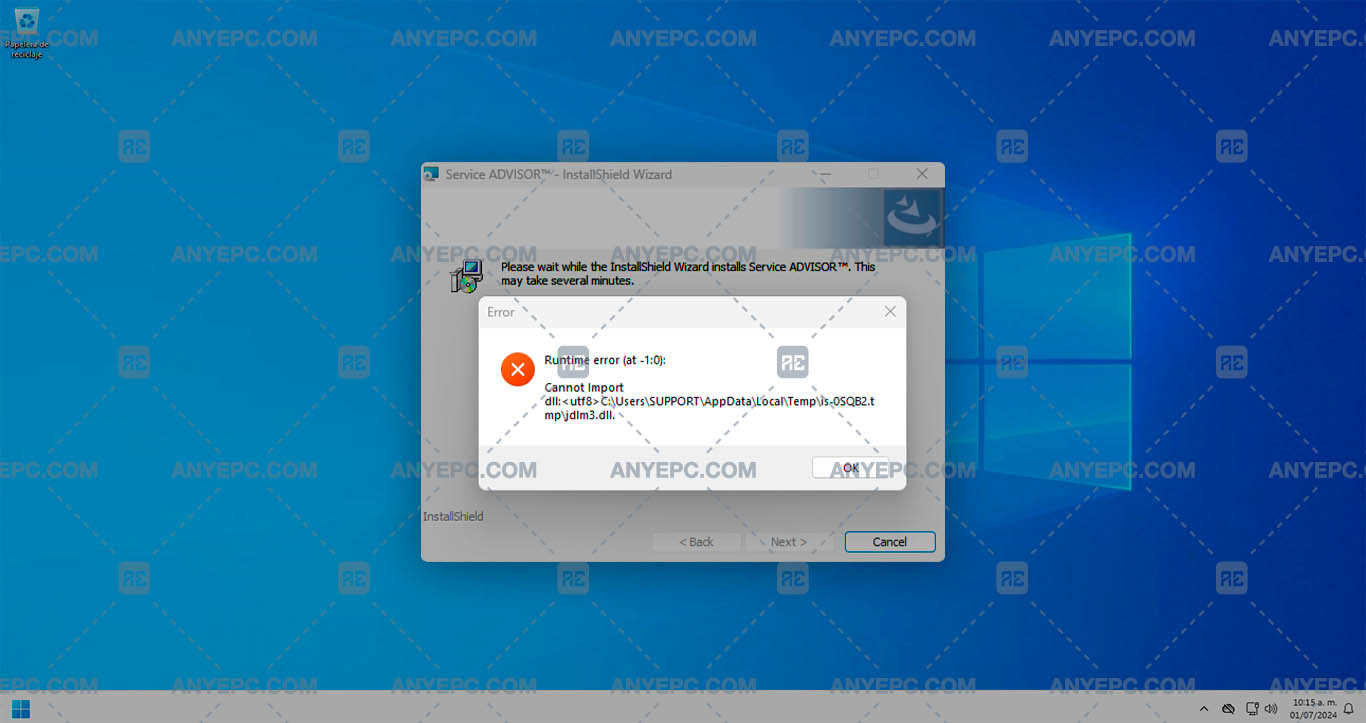
The runtime error with the code (at -1:0) indicates that the jdlm3.dll file, located in the temporary path c:\users\support\appdata\local\temp\is-0sqb2.tmp, cannot be imported. This problem can be caused by several factors, such as a corrupt dll file, incomplete installation of the software, or system permissions issues, preventing the system from properly loading the dll needed to run the program, which affects its operation.
Effects and consequences
By not being able to correctly import the necessary dll file, the software does not properly load its modules, which prevents the execution of the diagnostic functions, the inability to access certain program tools may result in a lack of connection between the computer and the machinery, the lack of access to the software prevents the detection and correction of faults in the machinery.
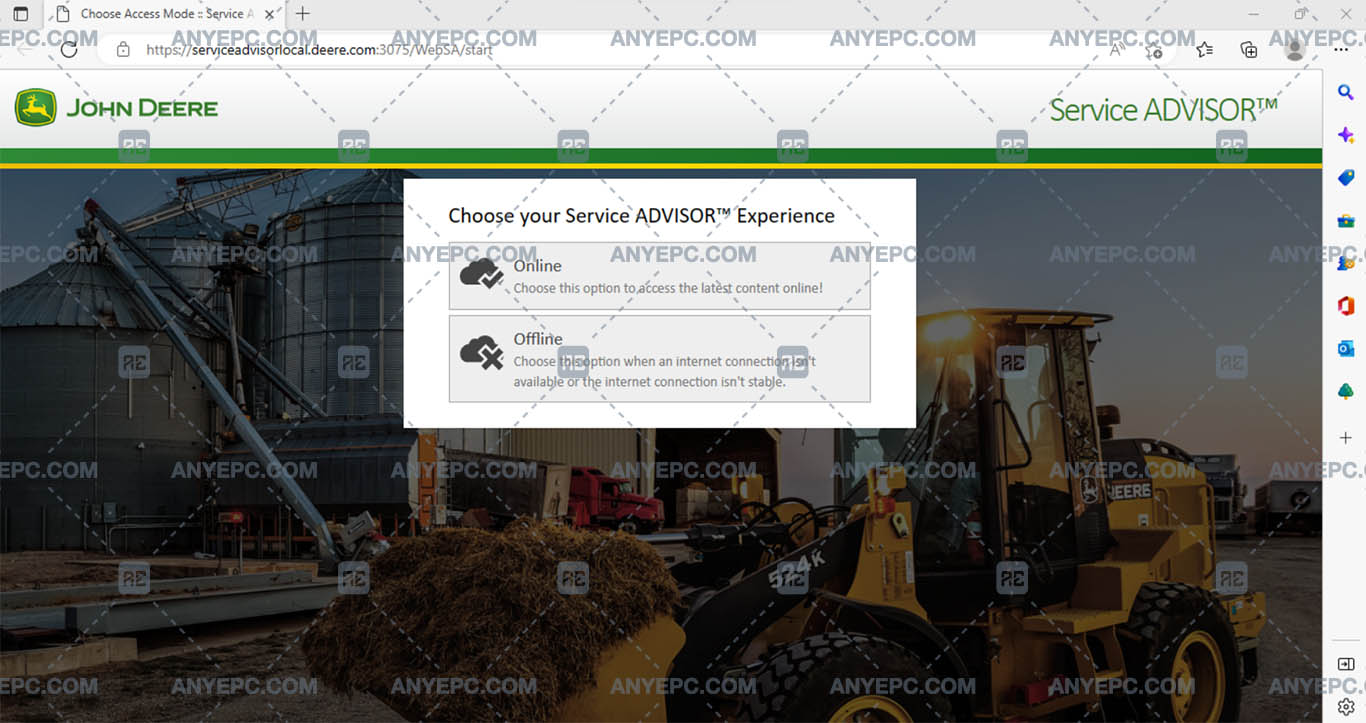
View of the implemented solution

MORE VERSIONS AVAILABLE
John Deere
![AGCO EDT 1.128.25317.1022 [2025.11]](https://anyepc.com/storage/products/617/617_bdfd2b8f-4945-44a5-92b9-4e561ec9afb4nwm.webp "AGCO EDT 1.128.25317.1022 [2025.11]")
MORE VERSIONS AVAILABLE
![CNH EST 9.14 [2026.02]](https://anyepc.com/storage/products/1113/1113_cf76bc9f-dad8-47eb-963f-a7aebe172483nwm.webp "CNH EST 9.14 [2026.02]")
Cnh
![ETIM GO FULL PACK 8.18 [2026.01]](https://anyepc.com/storage/products/77/77_75528d89-74f7-4a31-b9e8-66ccbd6a662fnwm.webp "ETIM GO FULL PACK 8.18 [2026.01]")
Cnh
![CLAAS WEBTIC OFFLINE ENGLISH 4.4.94 [2024.10]](https://anyepc.com/storage/products/512/512_34cb1363-267b-4e33-a5d2-412f5dc977b9nwm.webp "CLAAS WEBTIC OFFLINE ENGLISH 4.4.94 [2024.10]")
Claas Webtic Offline English 4.4.94 [2024.10]
$ 100.00
Claas
![ETIM GO CASE AGRICULTURE 8.18 [2026.01]](https://anyepc.com/storage/products/797/797_f864debc-348a-4f66-a579-8d7db7604e2fnwm.webp "ETIM GO CASE AGRICULTURE 8.18 [2026.01]")
Cnh
![JOHN DEERE & HITACHI PARTS ADVISOR 3.25.1 [2025.10]](https://anyepc.com/storage/products/707/707_369e2947-cf00-4832-a65f-ff364bbeac36nwm.webp "JOHN DEERE & HITACHI PARTS ADVISOR 3.25.1 [2025.10]")
John Deere
![ETIM GO NEW HOLLAND AGRICULTURE 8.18 [2026.01]](https://anyepc.com/storage/products/80/80_516e4f86-49ae-4da6-be30-098049641d29nwm.webp "ETIM GO NEW HOLLAND AGRICULTURE 8.18 [2026.01]")
Etim Go New Holland Agriculture 8.18 [2026.01]
$ 75.00
Cnh
![JOHN DEERE PARTS MANAGER PRO 6.6.5.0 [2025.03]](https://anyepc.com/storage/products/732/732_c0b44976-9150-4bf4-bd6a-2d4fb7b4f3eenwm.webp "JOHN DEERE PARTS MANAGER PRO 6.6.5.0 [2025.03]")
John Deere Parts Manager Pro 6.6.5.0 [2025.03]
$ 50.00
John Deere
![AGCO AG AGRICULTURAL ALL DATABASE NORTH AMERICA (NA) 2.1.80 [2020.03]](https://anyepc.com/storage/products/616/616_639a2259-947e-4c5d-90eb-e33f80a2755fnwm.webp "AGCO AG AGRICULTURAL ALL DATABASE NORTH AMERICA (NA) 2.1.80 [2020.03]")